
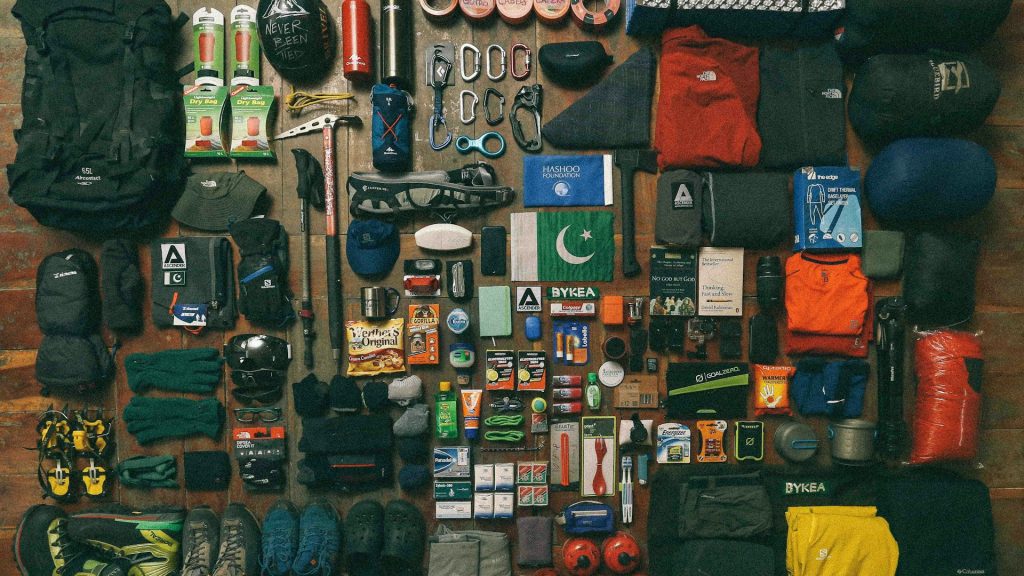
Sporting goods and outdoor gear stores face a product photography challenge that’s easy to underestimate until you’re staring at the catalog: a single store might sell a fishing lure small enough to lose in a pocket, a kayak long enough to need its own delivery truck, and a tent that only makes sense photographed both packed away and fully set up. Getting all of that to look like it belongs in the same store, at a consistent quality bar, is a genuinely different problem than most product categories deal with, and it’s exactly the kind of problem bulk editing was built to solve.
Why Outdoor Gear Photography Spans Such Extreme Scale
Few categories match sporting goods for sheer physical size variation within a single catalog. A carabiner, a pair of hiking boots, a mountain bike, and a paddleboard might all sit on the same category page, each demanding a completely different framing and zoom level to photograph well. Left to individual judgment across a long editing session, this variety produces exactly the kind of inconsistency that makes a catalog feel disorganized — some products carefully composed, others looking like an afterthought, purely because of how differently sized and awkward they are to shoot and edit consistently.
The Function-in-Use Problem
Unlike a lot of e-commerce categories where a clean studio shot tells the whole story, outdoor gear often needs to demonstrate function that a plain product photo can’t fully convey — how a tent looks pitched, how a backpack sits when worn and loaded, how a jacket performs in actual weather. This creates a two-layer photography need similar to what furniture and pet product sellers deal with: a clean, isolated product shot for the main listing image, and a separate in-context or in-use shot that shows the gear actually doing its job. Keeping both layers visually consistent across a catalog spanning wildly different product types is where a lot of outdoor retailers’ photo quality quietly breaks down.
Seasonal Category Rotation Adds Real Time Pressure
Outdoor gear sells on a strong seasonal cycle — skis and snowshoes in winter, camping and paddling gear in summer, hunting equipment tied to specific seasons — which means a retailer often needs an entire category’s worth of photography refreshed and ready right as that season’s buying window opens. Missing that window because a photo backlog is still being edited one product at a time costs real, measurable sales during exactly the weeks that category performs best, making this one of the categories where a slow manual editing process has the most direct, visible cost.
A Bulk Workflow for Extreme Size Variety
The practical approach starts with grouping products by rough size category — small accessories, mid-size gear, large equipment — and applying a centering and framing rule appropriate to each group rather than forcing every product through one identical template. A bulk background remover handles the plain product-shot layer across the entire catalog in one pass regardless of item size, while export settings generate whatever crop each size category actually needs to look properly composed rather than lost in too much empty frame or awkwardly cropped at the edges. Remove background multiple images free trials are worth running specifically against your most extreme size range — your smallest accessory next to your largest piece of equipment — before trusting a bulk process with a full catalog spanning this much variety.
Handling Technical Materials and Textures
Outdoor gear frequently uses technical fabrics and materials — reflective safety strips, mesh ventilation panels, waterproof coatings with a distinct sheen — that behave differently under background removal than simpler matte products. A bulk background remover needs to handle fine mesh edges and reflective trim without losing detail or leaving a rough, clipped edge, since these technical details are often exactly what a buyer is trying to evaluate when comparing similar gear from different brands.
Batch Editing Across a Multi-Sport Catalog
Many outdoor retailers span genuinely different sports and activities within one store — climbing, cycling, camping, water sports — each with its own typical product shapes and photography conventions. Edit multiple photos across these different sub-categories using a shared backdrop and lighting standard, even while each activity’s specific gear looks completely different, keeps the overall shop grid feeling like one coherent store rather than several disconnected specialty shops bundled under one brand name.
What to Look for in a Tool for Outdoor Gear Photography
Given how much size and material variety this category typically contains, it’s worth testing any bulk photo editor against your own most extreme cases — your smallest accessory, your largest equipment, your most technical fabric — in the same batch, rather than assuming a tool that handles hiking boots well will automatically handle a kayak or a mesh running vest the same way. It’s also worth confirming a tool can genuinely batch edit pictures that mix plain product shots and in-use action or lifestyle shots without forcing both through an identical treatment that doesn’t actually suit either one.
Reprocessing an Older Outdoor Gear Catalog
Retailers who’ve been selling gear for years often carry a catalog with visible layers of editing quality — older products shot and edited under a past standard sitting next to newer items processed under today’s approach. Because outdoor gear catalogs tend to accumulate over many seasons, this drift can be more pronounced here than in categories that turn over inventory faster. Bulk edit images retroactively across the older layer of a catalog, matched to the current standard, closes that visible gap without requiring a reshoot of gear that already has perfectly usable original photography behind an outdated edit.
How Pixeroom Supports Sporting Goods and Outdoor Gear Catalogs
This is exactly the kind of extreme-variety catalog Pixeroom is built to handle well. Upload a batch spanning tiny accessories through oversized equipment, and its bulk image background remover and size-appropriate centering tools apply consistent treatment across the entire mix in one process, rather than forcing every product through one identical template regardless of its actual scale. Mass edit photos from a mixed shoot session — climbing gear, cycling accessories, camping equipment, water sports gear — into a catalog that reads as one coherent outdoor brand no matter which category a shopper happens to be browsing.
To be clear about scope: Pixeroom edits and exports the images themselves. It doesn’t manage the actual product photography sessions, and demonstrating true in-field function — how a jacket performs in real rain, how a tent holds up in real wind — still depends on genuine testing and capture that no amount of editing can substitute for. What it removes is the downstream inconsistency of manually editing a catalog this varied in size and material, one product at a time, across every season’s new arrivals.
If your outdoor gear catalog currently looks visibly inconsistent between your smallest accessories and your bulkiest equipment, that’s a reasonable reflection of how genuinely hard this particular mix is to manage manually, not a sign that your products or your effort are the problem. A consistent bulk workflow, built around the specific size and material variety this category deals with, brings that inconsistency back under control ahead of each season’s buying window rather than during the middle of it.
Coordinating Gear Photos With Size and Fit Charts
Outdoor apparel and footwear in particular depend heavily on size and fit information that photos alone can’t fully convey, similar to the challenge pet product sellers face communicating scale against a moving target rather than a standard chart. A consistent visual framing approach across a size or fit-dependent product line at least keeps relative proportions meaningful within each product category, supporting whatever size chart or fit guide accompanies the listing rather than working against it with inconsistent, differently-cropped photos that make comparison harder than it needs to be.
Preparing Gear Photography for a New Season Launch
Because outdoor gear ties so tightly to seasonal buying windows, it’s worth building a standing pre-season checklist that treats bulk photo editing as a fixed step with its own deadline, completed well before that season’s launch date rather than squeezed in during the same week new inventory arrives. A tested, reliable batch workflow turns what could be a stressful seasonal scramble into a routine process, freeing up launch week for merchandising and marketing decisions instead of last-minute photo triage across dozens of newly arrived SKUs.
Handling Color and Camouflage Pattern Accuracy
Outdoor gear frequently relies on precise color matching for a specific technical purpose — a hunting brand’s proprietary camouflage pattern, a climbing brand’s safety-visible color coding, a specific trail-running shoe colorway that customers search for by name. A bulk picture editor applied without attention to color accuracy risks shifting these patterns and colorways just enough to look wrong to a buyer who knows exactly what they’re looking for, which makes color fidelity testing worth doing specifically for this category before rolling a new editing workflow out across an entire catalog. Testing a bulk picture editor against a handful of your most color-critical products, particularly anything with a branded pattern or a customer-searched colorway name, catches this kind of drift before it reaches dozens of live listings.
Comparing General Photo Tools Against a Purpose-Built Editor for This Category
Given how much size, material, and color variety outdoor gear catalogs contain, general-purpose photo tools built for simpler, more uniform product types often fall short here in ways that aren’t obvious until a retailer has already committed a chunk of catalog to them. A tool that performs well on flat, matte accessories doesn’t automatically handle a mesh vest’s fine ventilation panels, a kayak’s oversized scale, or a camouflage pattern’s exact color fidelity with the same reliability. Running a deliberate test batch against your own hardest cases — your smallest item, your largest item, your most texture- or color-critical item — before committing a full seasonal catalog to any new workflow is worth the small upfront time cost, since discovering a tool’s limitations mid-season, right as a launch window opens, is a far more expensive problem to run into.
Building a Repeatable Process Across Every New Product Drop
Outdoor brands that release new gear regularly — a new boot colorway, an updated tent design, a seasonal apparel refresh — benefit from treating the bulk editing pass as a fixed, non-negotiable step in every new product’s launch checklist rather than deciding fresh each time whether a smaller drop “needs” the same careful treatment as a major seasonal launch. Products edited this way consistently look more professional next to established catalog items, and building the habit once means every future drop benefits automatically from a proven, already-tested process rather than depending on how much time happens to be available during that particular week’s launch crunch.
Why This Category Rewards Getting the Details Right
Outdoor gear buyers tend to be unusually detail-oriented compared to average shoppers, often researching a specific technical spec or comparing near-identical models from competing brands before committing to a purchase that might need to perform reliably in genuinely difficult conditions. A catalog that looks carefully, consistently produced signals the same kind of attention to detail that a buyer hopes the actual gear was built with, while a sloppy, inconsistent photo set can quietly undercut confidence in a product regardless of how good the gear itself actually is. Getting the bulk editing workflow right for this category isn’t just a visual polish exercise — it’s part of how a detail-focused buyer decides whether to trust a brand at all.
This is particularly true for gear tied to safety-critical use — climbing harnesses, helmets, avalanche safety equipment — where a buyer’s trust in the seller’s overall diligence and professionalism carries extra weight given what’s actually at stake if the gear underperforms. A consistently edited, carefully presented catalog won’t substitute for genuine product quality, but it removes one more reason for a cautious, research-driven buyer to hesitate before choosing your listing over a competitor’s.
Building that trust at scale, across a catalog spanning dozens or hundreds of technically diverse SKUs, is exactly where a proven bulk workflow earns its keep season after season.
Treat it as infrastructure, not a one-time project.
A workflow worth building once and reusing every single season.