
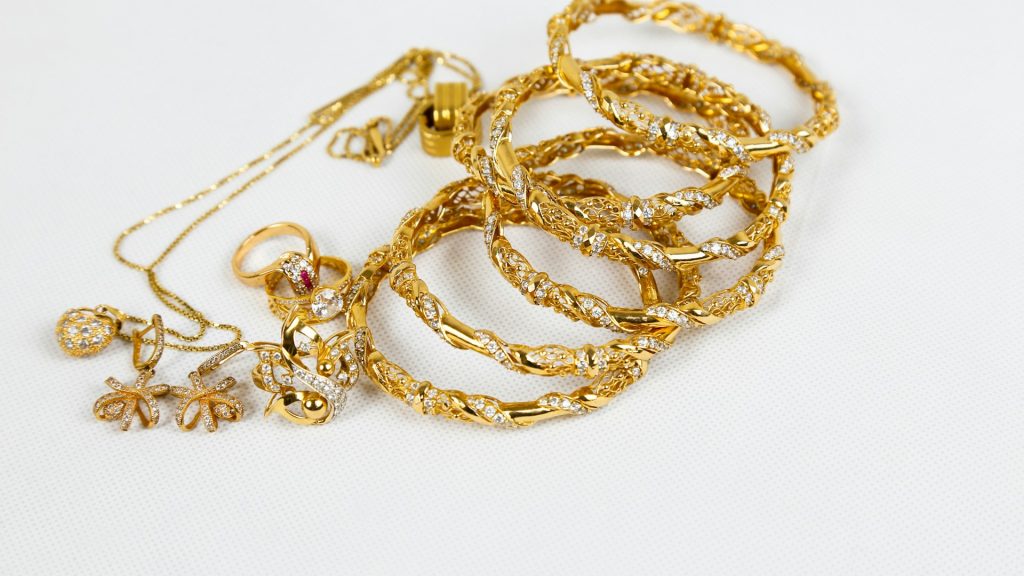
Small products create some of the largest photo workloads in e-commerce, which is a strange thing to say about items that fit in the palm of a hand. A jewelry seller with thirty ring designs doesn’t have thirty product photos to manage. They have thirty designs times however many metal finishes, times however many stone colors, times however many sizes — and suddenly a catalog that sounds small on paper turns into eight hundred individual images that all need to look clean, consistent, and true to color, with no visible seams between one variant and the next. This is the part of selling small products that generic e-commerce advice rarely accounts for: it isn’t the size of the item that makes the photo workload large, it’s the sheer number of near-identical variants that multiply a handful of designs into a genuinely enormous photo library.
Why Small Products Break Generic Bulk-Editing Assumptions
Most advice about editing multiple photos at once assumes the product fills a reasonable portion of the frame and has clear, simple edges — a bottle, a box, a garment. Tiny products break both of those assumptions at once. A stud earring might occupy a tiny fraction of the original photo, surrounded by far more background than product. A thin chain or wire setting has almost no solid mass to work with at all — just delicate lines against whatever surface it was shot on. Editing tools built around bigger, simpler products often struggle here in ways that aren’t obvious until you’ve run an actual batch of jewelry photos through them and seen the results.
This is why jewelry and small-accessories sellers need to think about bulk photo editor selection differently than a seller of home goods or apparel. The core need is the same — process a whole folder at once instead of one photo at a time — but the technical bar for handling fine detail accurately is considerably higher, and it’s worth checking that bar before committing an entire catalog to a workflow that turns out not to be built for it.
The Fine-Edge Problem: Chains, Wires, and Thin Details
The single biggest technical challenge in editing small jewelry products in bulk is what happens at the very edge of the item — the thin gold wire of a chain, the delicate prongs holding a stone in place, the fine mesh of a bracelet. A background removal process built for larger, simpler shapes tends to either lose fine detail entirely, leaving jagged or incomplete edges, or leave a faint halo of the original background color clinging to the edge, which becomes obvious the moment the item sits against a new backdrop. Neither failure is acceptable for jewelry specifically, because the fine detail is often the entire selling point of the piece.
A bulk background remover that’s actually built to handle this level of detail treats edge precision as a core requirement, not an edge case. That distinction matters enormously at scale: a background removal error that’s barely noticeable on one photo becomes a real problem when it repeats identically across eight hundred variants of the same design, because it stops looking like an isolated mistake and starts looking like a systemic quality issue across the entire catalog.
Keeping Scale Consistent When Products Vary Wildly in Size
Jewelry and accessories catalogs often mix genuinely different physical sizes within the same shop — a delicate stud earring next to a statement necklace next to a wide cuff bracelet. Photographed at their true relative scale, a stud earring would be nearly invisible next to a necklace in the same frame size, so every category typically gets shot at a different zoom level to keep the product reasonably visible. The challenge is making sure that different zoom levels don’t translate into a shop grid where some products look tiny and lost in their frame while others fill it edge to edge.
Editing multiple photos at once with a centering system that accounts for the product’s actual proportions, rather than just fitting a fixed template, keeps this consistent. Whatever the original zoom level was, each item ends up occupying a similar visual weight within its frame relative to other items in its own category, so a shop full of wildly different physical sizes still reads as one coherent, professionally presented catalog rather than a grid where framing quality visibly depends on what happened to be photographed that day.
Handling Variant-Heavy Catalogs
The variant multiplication problem deserves its own attention because it’s genuinely unique to categories like jewelry, where a single design might reasonably need photos in gold, silver, and rose gold, each in three stone color options, each in multiple ring sizes that don’t actually look any different in a photo but still technically need their own listing image. This is where bulk edit images stops being a nice-to-have efficiency gain and becomes the only realistic way to keep a catalog current. Manually re-editing eight hundred images every time a new design launches with its usual set of variants simply isn’t sustainable, and it’s exactly the kind of workload that causes sellers to either delay new launches or cut corners on the images for lower-priority variant combinations.
Processing an entire variant set as a single batch — same background, same centering rule, same export settings — means a new design with twelve color and size combinations takes roughly the same effort to prepare as a design with two. The workload stops scaling with variant count, which is the only way small-item catalogs with heavy variation stay manageable as they grow.
Lighting and Reflection Challenges Unique to Jewelry
Metal and gemstones behave differently under a camera than almost any other product category — they reflect, refract, and catch light in ways that shift dramatically based on angle and the exact lighting setup used that day. This creates a specific consistency problem: two photos of the identical gold band, shot minutes apart under slightly different lighting, can look like noticeably different shades of gold once viewed side by side in a shop grid. Buyers shopping for jewelry are unusually sensitive to exactly this kind of color accuracy, since metal tone and stone color are often the entire reason they’re choosing one variant over another.
Batch background removal helps here in an indirect but meaningful way: once every item sits against the exact same clean, neutral backdrop instead of a variety of original shooting surfaces, subtle color and lighting differences between photos become much easier to spot and correct as a set, rather than being masked by inconsistent surroundings that make comparison difficult in the first place.
A Practical Bulk Workflow for Small-Item Sellers
The workflow that tends to work best for jewelry and small-accessories sellers mirrors how the catalog itself is organized: batch by design rather than by shooting session. Photograph one design across all of its variants in a single sitting, under consistent lighting and the same macro setup, then process that entire variant set together as one job — same background, same centering, same export sizes across gold, silver, rose gold, and every stone option at once. This keeps each design internally consistent, which matters more to jewelry buyers comparing variants side by side than perfect consistency across completely unrelated designs would.
What to Look for in a Tool Built for Small Products
Given how different small-product editing is from typical bulk photo editing, it’s worth being specific about what actually matters when evaluating a bulk picture editor for this use case. Edge precision on fine detail comes first — test it against your actual thinnest chain or most delicate setting before trusting it with a full catalog, not against a simple, forgiving example. Second, check whether centering genuinely adapts to a product’s real proportions rather than assuming every item is roughly similar in size, since jewelry catalogs mix scales more than almost any other category. And because testing matters more here than for simpler products, look for a bulk background remover online option that lets you run a real batch of your own trickiest images before deciding whether the tool can actually handle what your catalog needs.
Why Color and Detail Accuracy Reduce Returns in Jewelry Specifically
Jewelry sits in an unusual spot among product categories: it’s expensive enough that buyers scrutinize photos closely before purchasing, but delicate enough that a slightly misleading photo — a stone that reads a shade brighter than reality, a chain that looks thicker than it is — creates a genuine mismatch between expectation and reality once the item arrives. That mismatch is one of the more common drivers of jewelry returns, and it’s largely preventable through consistent, accurate editing rather than better marketing copy. When you remove background of multiple images using the same neutral backdrop and the same color-neutral processing across an entire catalog, color and scale distortions become much easier to catch and correct before a listing ever goes live, instead of being discovered for the first time by a disappointed customer.
Building a Review Step Into the Batch Process
Because small-product photography is so sensitive to fine detail, it’s worth treating the review step as part of the editing workflow rather than an afterthought. After you edit multiple photos as a batch, scrolling through the finished set side by side — every variant of a design lined up together — makes it much easier to catch a stone color that came out inconsistent, an edge that wasn’t cleaned up quite as precisely as the rest, or a piece that ended up scaled slightly differently than its siblings. This kind of comparison is nearly impossible to do well when photos are edited and published one at a time, since there’s nothing to compare each new edit against in the moment. Reviewing a full variant batch together turns what would otherwise be invisible inconsistencies into obvious ones, while there’s still time to fix them before a customer ever sees the listing.
How Pixeroom Handles Small-Product Catalogs
This is exactly the kind of catalog Pixeroom is built to support. Upload a full variant set — every color, every stone option, every size combination for a given design — and its bulk image background remover handles fine detail like chains, prongs, and thin wire settings without leaving the halos or lost edges that generic tools tend to produce on delicate items. Its centering tools account for each product’s real proportions, so a stud earring and a statement cuff both end up framed appropriately within their own category rather than forced into one identical template. Mass edit photos across an entire new launch — however many variants it includes — and the whole set comes out consistent, on the same backdrop, at the same quality, in a single batch rather than hours of individual editing sessions.
As with any catalog, it’s worth being clear about scope: Pixeroom edits and exports the images. It doesn’t manage inventory across variants, generate listings, or publish anything to a storefront — it handles the part of a jewelry or accessories business that scales the fastest and the most invisibly, which is the sheer number of near-identical photos a growing catalog of variants quietly requires.
If your jewelry or accessories catalog currently feels impossible to keep visually consistent, that’s rarely about the products themselves. It’s almost always the variant math catching up with a workflow that was never built to handle this many small, delicate, closely related images at once. Fixing the workflow, rather than trying to work harder within it, is usually what actually solves the problem for good.
It’s also worth remembering that this problem only gets bigger as a jewelry business succeeds. Every new design that launches with its own set of metal and stone variants adds to the total photo count permanently — there’s no point at which the catalog naturally shrinks back down. A workflow that treats variant sets as single batch jobs from the start scales cleanly alongside that growth, while a workflow built around editing one photo at a time falls further behind with every successful new launch, which is exactly the wrong direction for a growing catalog to be heading in.